Homeowner associations and property managers
Parking residents charge by invitation; outsiders cannot use the station. Want to let guests in? Enable payments: the income lands on the association's account, with a per-session report for accounting.
Authorized YooKassa Partners API partner
A live map of stations and connectors, tariffs, drivers, invoices and remote commands. By default a station serves only your own people — employees and invited drivers.
When you decide to earn, connect your YooKassa shop and drivers' payments go straight to your bank account. The receipt carries your tax ID; our fee is 6% per receipt.
Who it is for
Sole proprietors and companies with 1–15 stations. A couple of stations is our primary scenario, not a «small client». Not for self-employed individuals: the Russian self-employment tax regime is incompatible with taking charging payments.
Parking residents charge by invitation; outsiders cannot use the station. Want to let guests in? Enable payments: the income lands on the association's account, with a per-session report for accounting.
Tenants charge by invitation, and outside cars do not take the spots. Guest traffic is monetized by the same station — no second system and no in-house IT department.
Charging for guests is an amenity like parking and Wi-Fi. A hotel by a highway enables payments for passers-by, and the station earns even in low season.
Company vehicles charge under internal rules, visitors pay the commercial tariff. While a car charges, the average ticket in the station shop grows.
One or two stations by the road. EV drivers plan routes by the charging map — the station brings customers to you, and the payment lands on your account.
5–15 stations: some for the maintenance service, some for parking-space tenants at a tariff. Several legal entities and networks under one account, access by RFID cards.
Your own network of stations and connected owners, your tariffs and your commission — on a dedicated installation of the platform under your brand.
Modes and pricing
Every account starts in «Own fleet». Payment acceptance is switched on by connecting a YooKassa shop and off by revoking it — stations, history and settings are kept. Registration, the portal and station onboarding are free.
While you have 3 stations or fewer, charging is free on all of them. Once station 4 connects, every station is billed, including the first 3. Billed per kWh of actual charging on a connector — not idle time and not the station itself.
Foreign platforms of this class take 8–10% per transaction plus a yearly fee per port, and aggregators route revenue through their own balance. Here it is 6% and direct settlement. The rate is fixed in the contract.
Money flow
The key difference from aggregators is the path of the money. A payment is born directly in your YooKassa shop: the funds never reach our accounts, so we are physically unable to hold them.
The driver scans the QR code and sees your station: free connectors, tariff, limit and the hold amount. Pays by card or SBP — no registration and no app install. Only the actual consumption is charged.
pay.ocpp-css.com/charge/…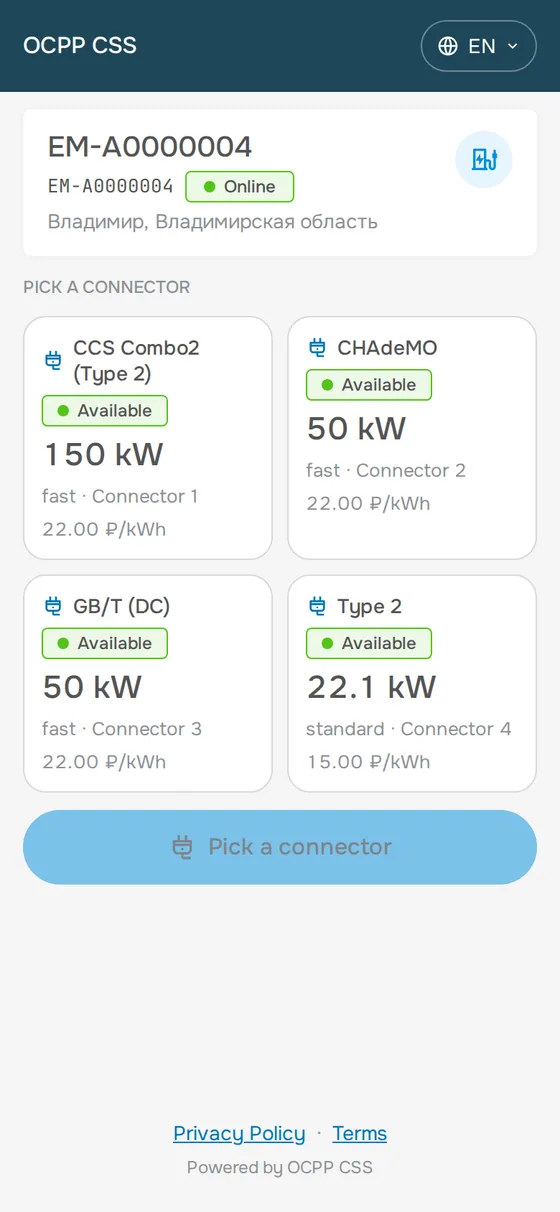
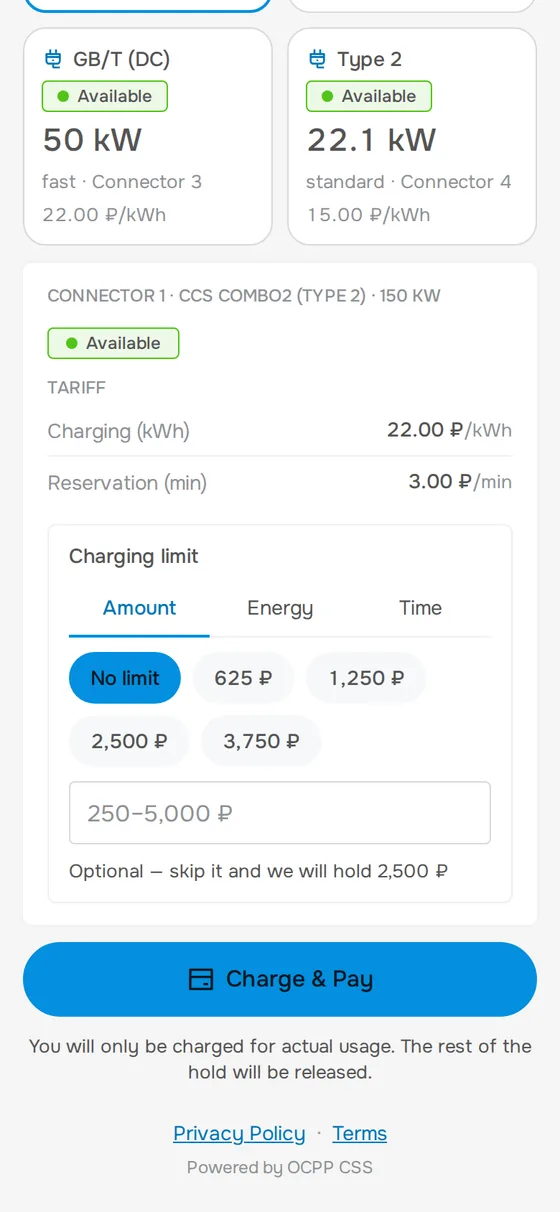
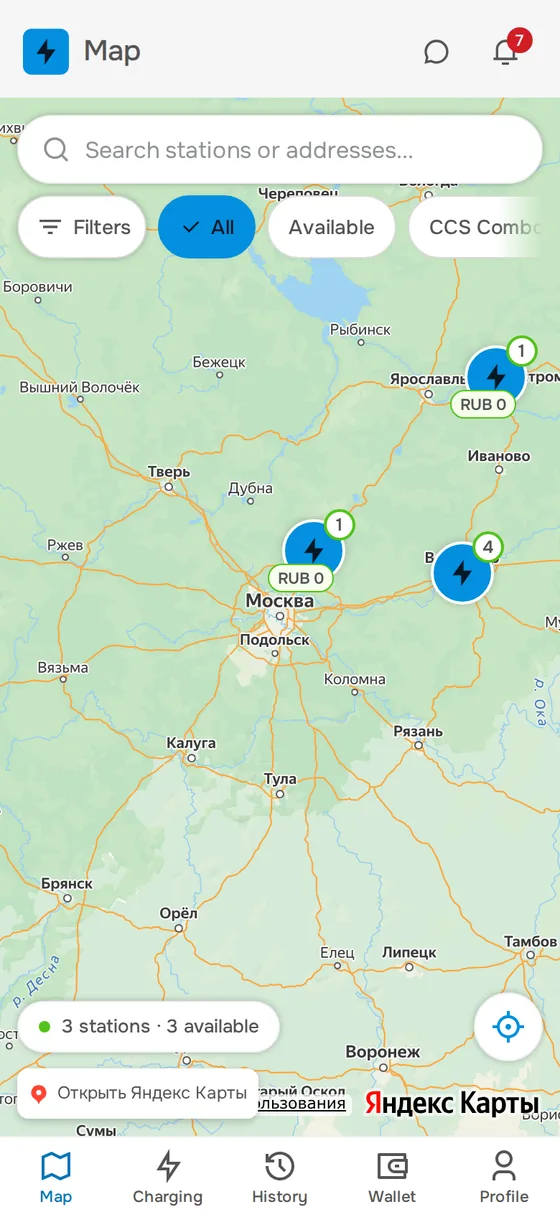
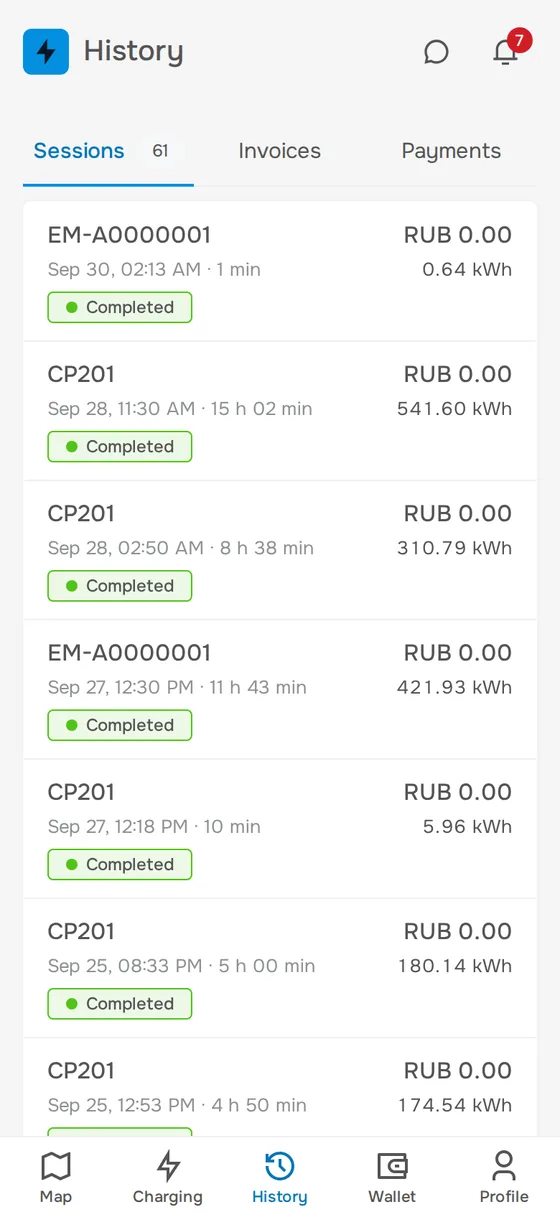
A station map with connector filters, session history, wallet, saved cards and RFID tags. Installs on a phone in one tap — no app stores.
The platform creates the payment on your behalf via the OAuth Partners API — YooKassa's standard interface for platforms. It is a regular payment of your shop, not a transfer through somebody else's balance.
YooKassa settles the funds on its usual schedule, as for any online store. Our fee is invoiced separately once a month, itemized per session.
YooKassa ≈ 3.8 ₽ · OCPP CSS 6 ₽ · yours after the fee invoice ≈ 90.2 ₽ — out of 100 ₽The receipt goes to the driver and to the fiscal data operator on behalf of your shop — via a YooKassa online cash register, for example «Receipts from YooKassa» by Evotor. The platform stays out of fiscalization.
Calculator
Including electricity, acquiring, the online cash register, our fee and tax. Move the sliders — the numbers adapt to your conditions.
Assumptions: 25 kWh per session, electricity 11 ₽ per kWh, 30 calendar days a month. The estimate is approximate: energy prices and the average payment depend on the location, check the tax part with your accountant.
Step-by-step onboarding
Every step is a short action in the portal, in the station settings or in your YooKassa account. No managers, calls or waiting.
Email and password — under a minute. The portal opens right away: station map, live sessions, tariffs, clients, invoices, the OCPP log.
cloud.ocpp-css.com ↗Application form, passport, tax ID and bank details — online. Connect an online cash register right away: Evotor's «Receipts from YooKassa» covers the 54-FZ requirements automatically.
YooKassa sign-up ↗The «Connect YooKassa» button takes you to yookassa.ru: pick the shop, confirm access — and you return already connected. The permission list is shown before you confirm.
In the station's web interface enter your personal connection address — you can find it in the «Stations» section under the «Connect a station» button. Save and restart the station: it comes online within a minute. Any station with OCPP 1.6 or 2.0.1 will do.
wss://ws.ocpp-css.com/ocpp/[your-login]/[station-id][your-login] is the username you chose when registering in the portal. [station-id] is what you entered when adding the station, usually its serial number.
| In the station settings | What to enter |
|---|---|
| Full address (URL) | wss://ws.ocpp-css.com/ocpp/[your-login]/[station-id] |
| Server (Host) | ws.ocpp-css.com |
| Port | 443 (wss) or 80 (ws) |
| Path | /ocpp/[your-login]/[station-id] |
| Scheme | wss (recommended) / ws |
| Charge Point Identity | [station-id] from the address — what you entered when adding the station |
Exact field names are in your station manufacturer's manual. The station identity must match the last path segment of the address.
Done — the station appears in the portal automatically. All that remains is to set the coordinates and connector types (Type 2, CCS, CHAdeMO, GB/T): the OCPP protocol does not transmit them.
Prices per charging mode and service: kWh or minute, waiting, idle, reservation; an hourly schedule. The driver sees the tariff before starting, and the money for the charge lands on your account the next business day.
Revenue calculator ↓What you get
Four systems come on with the station. Everything listed already works — this is the product, not a roadmap.
White-label CSMS
For charging networks, energy companies, station makers and fleets: the Apostol CSMS platform that runs OCPP CSS — as a dedicated installation on your domain, with your logo, colours and legal entity. OCPP CSS is one such brand: everything you can open from this site you get under your own name.
| Criterion | OCPP CSS | White-label CSMS |
|---|---|---|
| For whom | Sole proprietors and companies with their own charging stations | Charging networks, energy companies, station makers, fleets, developers |
| Brand and domain | OCPP CSS, ocpp-css.com | Yours, on your own domain |
| Installation | The shared OCPP CSS service | Your own — with us or on your servers |
| Your clients | You manage your stations and drivers | You also onboard station owners — the commission on their receipts is yours |
| Getting started | Self-service: a station connects in about 15 minutes | A briefing, then an assisted launch |
| Price | Published tariffs — see «Pricing» | An individual offer after a briefing |
Context
A CSMS (Charging Station Management System) turns hardware into a service with a map, tariffs, payments and receipts. If you are still deciding whether to invest in charging infrastructure, this section is for you.
OCPP 1.5, 1.6 and 2.0.1 — one language for stations of any age and make. Roaming over OCPI 2.2.1/2.3.0 in both roles: network owner and aggregator.
A payment in your YooKassa shop: cards, SBP, SberPay and refunds — via the standard Partners API.
A receipt with the owner's tax ID via a connected online cash register. The fiscal data operator and storage are on YooKassa's side.
A one-off QR payment without registration, or a personal account in the app: history, wallet, RFID tags, notifications.
Funds frozen before charging starts, card limits, driver checks — with no operator involved.
Connection monitoring, dropped-link handling, session recovery, reports — the portal does the routine itself.
A shop does not build its own acquiring — it connects YooKassa or T-Kassa and accepts every bank's cards plus SBP.
A seller does not build its own logistics — it joins Wildberries or Ozon and sells nationwide.
A station owner does not develop a CSMS — they connect to OCPP CSS: portal, app, payments and receipts without own servers or developers.
Who stands behind it
OCPP CSS is one of the brands on the Apostol CSMS platform: the same software that is installed for White-label, on a dedicated installation and in production — with real drivers and real money. The portal and the driver app are open to browse before you sign up.
The contract is directly with the platform developer, no intermediaries.
Partners
Manufacturers and suppliers of charging stations that OCPP CSS works with.
 Hardware partner
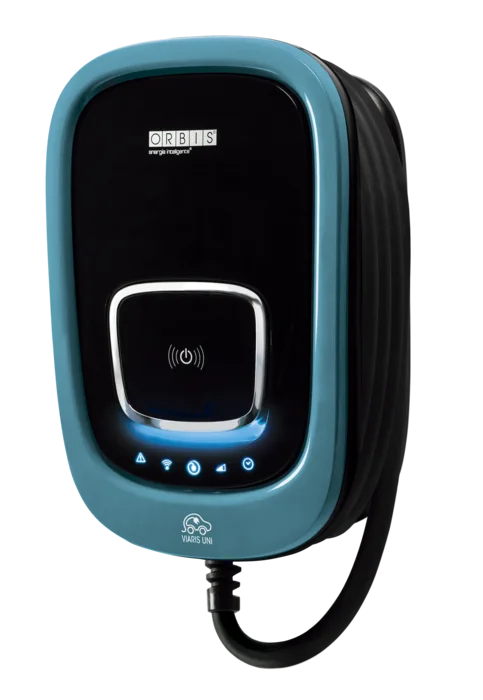
ORBIS has been making electrical equipment for energy management since 1950. In Russia the brand is represented by OOO «ОРБИСЭЛЕК», Moscow: supply, consulting, installation, commissioning and service. The VIARIS line runs from wall-mounted 7.4 kW units to 60 kW DC fast chargers.
| Model | Type | Power | Connectors |
|---|---|---|---|
| VIARIS UNI | AC, wall-mounted | 7.4 / 22 kW | Type 2, GB/T |
| VIARIS COMBI+ | AC, two outlets | 2 × 22 kW | Type 2, GB/T |
| VIARIS CITY+ | AC, metal housing | 2 × 22 kW | Type 2 |
| VIARIS GRAVITY | DC, fast | 30 / 40 kW | CCS2, GB/T, CHAdeMO |
| VIARIS LANDER | DC, fast | 60 kW | CCS2, GB/T, CHAdeMO |
Model range as listed in the ORBIS catalog.
Questions
Did not find the answer? Write to support — we reply within one business day.
Yes. Every new account runs in the «Own fleet» mode: up to 3 stations are free; from station 4 on, all stations (including the first 3) are billed at 0.88 ₽ per kWh of actual charging. The invoice goes to you as the owner and is paid from the prepaid balance in the portal — drivers pay nothing. If the balance runs out, only new sessions are blocked: stations stay online and data is kept.
You do. The payment is created directly in your YooKassa shop, the funds arrive on your bank account the next business day, and the receipt carries your tax ID. The platform only initiates payments on your behalf over the OAuth Partners API — it never sees or touches your money.
Once a month we issue an invoice for the fee across all paid sessions, itemized per session. It is a regular contractor's invoice under the agreement: the drivers' revenue is not involved.
Yes, the switch is automatic. While no YooKassa shop is connected, «Own fleet» applies. Connect a shop via OAuth in the «Billing» section — new sessions are billed at 6% per receipt and the money goes to your account. You can disconnect the shop any time; stations, data and history are kept.
In your YooKassa account, under «Authorized applications», find «OCPP CSS» and press «Revoke». Payments through the platform stop immediately. No calls needed, no penalties.
The OAuth Partners API limits access to defined operations: creating payments, checking their status, refunds. Your shop settings, balance and profile data are not accessible to us. The exact permission list is shown on the YooKassa page before you press «Allow».
Any station speaking OCPP 1.5, 1.6 or 2.0.1 — more than 95% of the market. Operation is confirmed with hardware from dozens of manufacturers, including ABB, Schneider Electric, Wallbox, EVlink, Sigma, EnerCharge, Atess and VIARIS.
That is our primary scenario: a roadside cafe, a small hotel, a homeowners association. The terms do not depend on the number of stations, and onboarding takes the same time for one as for thirty.
Yes. One account can hold several organizations — convenient when stations belong to different legal entities. Corporate clients can get their own theme, logo and domain.
We recommend «Receipts from YooKassa», Evotor's program for new sole proprietors and legal entities (available until December 1, 2026): it connects in your YooKassa account, with the fiscal storage and data operator on its side. Your own register works too: ATOL Online, Evotor, KOMTET.
The driver's receipt is issued with your tax ID via the online cash register connected to YooKassa. VAT follows your tax regime: none on the simplified regime, 22% on the general one. The platform stays out of fiscalization.
In the portal, per station: per kilowatt-hour or per minute, waiting, idle and reservation fees, schedules by time of day and day of week. The driver sees the tariff before charging starts — in the app or on the QR payment page.
Yes. On most stations the OCPP server address is changed via the local web interface or an administrator RFID card. No firmware changes are required.
Charging itself does not depend on the cloud: the station keeps working, and on most models OCPP messages are stored locally and delivered once the link is back. The portal shows the outage immediately.
Software and payments are our territory: station status is visible in real time, some problems are solved by a remote reboot from the OCPP Pro console, and a defect ticket moves through «Open → In progress → Resolved». Physical repair belongs to the manufacturer or your service company; we provide diagnostics.
The path of the money, and entry without managers. On most platforms revenue first lands on the platform's own account or balance; here the payment is born in your YooKassa shop. Onboarding is self-service, pricing is published, and neither the contract nor the prices hide behind «book a demo».
Support
We reply within one business day. You can also write by email:
info@ocpp-css.comRegistration takes a minute, a station connects in fifteen. If questions come up, support replies within one business day.
Own fleet — 0 ₽ up to 3 stations · payment acceptance — 6% per receipt · disconnect in one click